
Business Contact Enrichment — Instantly Get Name, Title, Email, Phone & LinkedIn Profile

Turn any TikTok username or user ID into structured profile video data — author info, engagement, music, media URLs — in one bulk run.
Turn any TikTok username or user ID into a clean, structured dataset of profile videos — creator metadata, engagement metrics, music info, and media URLs — in a single run. Bulk-collect multiple accounts at once and export the results in any of 8 formats, without manual scrolling or copy-pasting.
This worker returns the complete public video record per profile — pinned posts, reposts, slideshows, and sponsored flags included — sorted the way you need them.
musicMeta, hashtags, and mentions on each video to study how sounds and tags drive reach.| 👤 Creator profile (username, nickname, bio, avatar, region, follower & like counts) | 🎬 Video metadata (duration, dimensions, aspect ratio) |
| ▶️ Plays / views | ❤️ Likes |
| 💬 Comments | 🔁 Shares |
| 🔖 Collects / favorites | 🔄 Reposts |
| 🎵 Original sound & music metadata | 🏷️ Hashtags |
| 👥 Mentioned users | 📋 Detailed mention objects |
| 📍 Location metadata | 🖼️ Media URLs and slideshow image links |
| ✨ Effect stickers | 📌 Pinned status |
| 🎞️ Slideshow, muted, ad, and sponsored flags | 🗂️ Profile section (videos / reposts) |
| 🎭 Short drama series info | 🔗 Public web video URL |
| 📅 Publish time (Unix timestamp and ISO 8601) | 💬 Comments dataset link (scrape separately for deep analysis) |
| ⌨️ Original input value that produced each row |
Beyond the fields themselves, the worker also provides:
Provide the TikTok accounts and scraping options below; the worker handles collection and returns structured results.
profilesThe TikTok username(s) or user ID(s) to scrape. One per line; supports bulk edit for many accounts.
Use the username as it appears in the profile URL (https://www.tiktok.com/@nike → nike). User IDs also work, but usernames are easier to manage and re-run.
Recommended:
Not recommended:
Full URLs and a leading @ are not the raw username and may be rejected. Pass the bare handle instead.
profileScrapeSectionsWhich content types to collect from each profile. Multi-select.
videos — the creator's own posted videos.reposts — videos the creator has reposted. Select this only if you also want reposted content in the results.Recommended: select videos for standard profile scraping. Add reposts only if you need to analyze the account's reposting behavior.
profileSortingThe order in which each profile's videos are arranged before the top max_results are taken.
latest — most recently published first. Best for catching fresh content; usually the highest yield.oldest — oldest first. Useful for backfilling a creator's full history.popular — most popular first. Note: TikTok caps popular-sorted results at roughly 400–500 videos per profile, and you may get fewer than with latest or oldest.Recommend latest for monitoring and oldest for full-history backfill. Use popular only when you specifically need top-performing videos.
max_resultsThe maximum number of videos to collect from each profile.
This is a per-profile cap, not a global cap. With 5 profiles and max_results: 20, you can get up to 100 videos total.
Recommended: 20 for a quick sample, 100–300 for deeper analysis. Under latest/oldest, you can get up to roughly 400–500 videos per profile; popular returns fewer.
excludePinnedPostsWhen true, pinned posts are excluded from the profile's results. Default false (pinned posts included).
Leave it off to keep a faithful mirror of the profile (pinned posts included). Turn it on for engagement analysis, so pinned content doesn't skew the metrics.
Each row is one video, written to the CoreClaw result table. The columns cover every field listed above; any extra fields TikTok returns are added automatically.
fromProfileSection to separate original videos (videos) from reposts (reposts), and isPinned to isolate pinned content.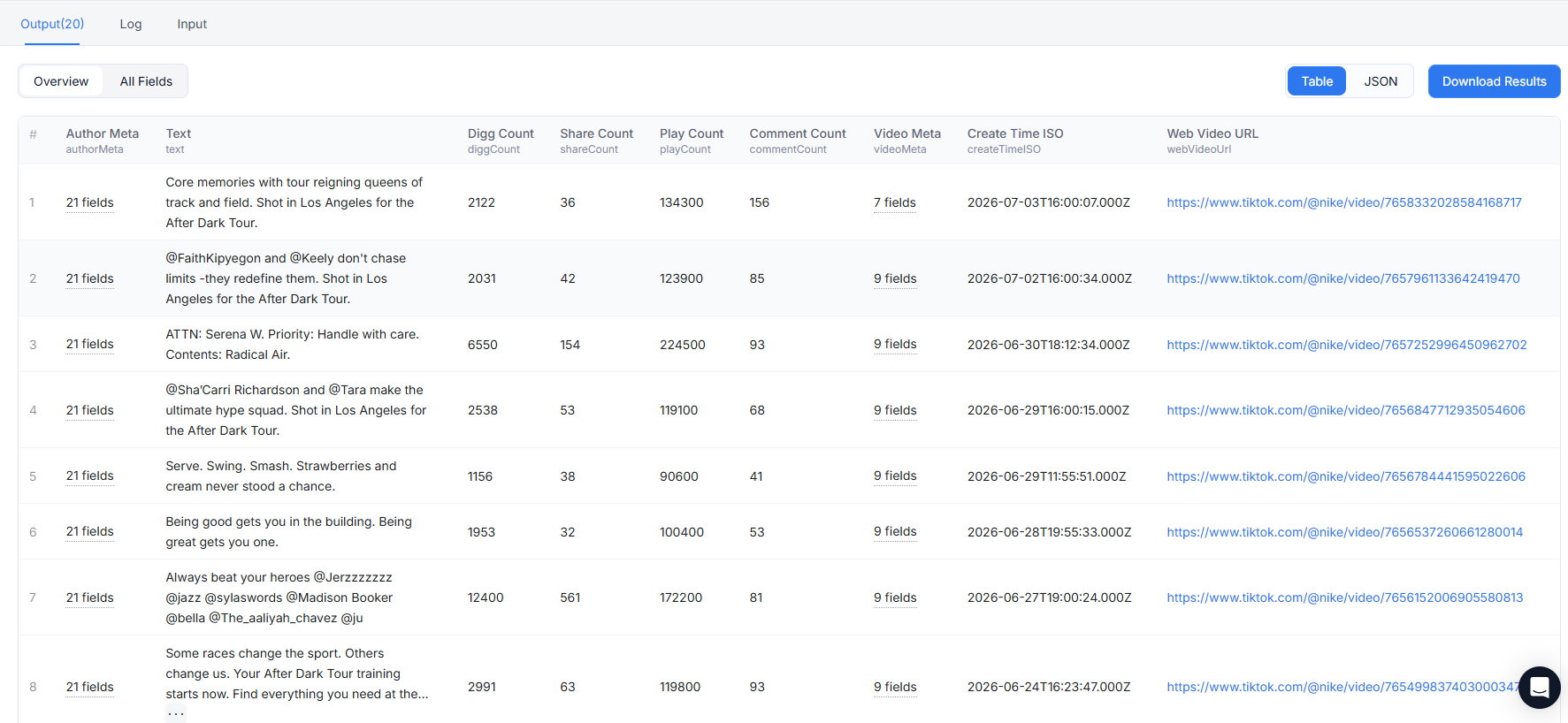
A single successful video record, captured from a real nike profile scrape. Every key is a real output column; values are the actual fields TikTok returns (asset URLs shortened for readability).
A few things worth noting in real output: isAd is true for most videos from brand/creator accounts — TikTok flags promoted content this way, not just paid ads. hashtags and mentions arrive as structured arrays (objects with name, and @handle strings). When a video is a photo slideshow, isSlideshow is true, videoMeta zeros out, and slideshowImageLinks carries the image set; for regular videos, slideshowImageLinks is an empty string and videoMeta carries real dimensions.
playCount, diggCount, commentCount, shareCount, collectCount, repostCount — the six core engagement counters on every video. Use them to compute engagement rates (e.g. diggCount / playCount) and rank a creator's content.
authorMeta carries the creator's account-level metadata — username, nickname, verification status, bio, avatar, region, and follower/following/like/video counts. A snapshot travels with every video row, so you can deduplicate down to a single profile record.
musicMeta (sound metadata), hashtags (list of tags), mentions (list of mentioned users), and detailedMentions (structured mention objects). Together they explain how a video reaches its audience — which sounds and tags are driving views.
videoMeta (duration, dimensions, ratio), mediaUrls, slideshowImageLinks, effectStickers, plus the boolean flags isSlideshow, isMuted, isAd, isSponsored, isPinned, and fromProfileSection. Use them to filter by post type (slideshow vs. video), strip out ad or sponsored content, or separate pinned from organic posts.
createTime and createTimeISO record the publish time in two formats — one machine-friendly, one human-readable — so you can sort videos chronologically or build a publishing timeline. webVideoUrl is the browser-openable link to the video on TikTok. commentsDatasetUrl points to a separate comments dataset you can scrape on its own when you need deeper comment analysis.
Provide one or more TikTok usernames (or user IDs) plus scraping options. The worker collects the profile sections you select, orders the videos as you choose, and writes every video as a structured row to the CoreClaw result table.
Yes. The profiles field accepts a list of usernames/user IDs (one per line). Each profile is scraped independently up to your max_results cap, and all results land in a single output table tagged with the originating input value.
The main lever is max_results — set it to only what you need, since collecting more videos per profile takes longer. The profiles field also supports concurrency, so the platform can fan large account lists out across parallel runs.
Not guaranteed to be complete. TikTok caps the number of videos visible on a single profile — under latest/oldest sorting you can retrieve roughly 400–500 per profile, and popular returns fewer. To pull as much history as possible, set profileSorting to oldest and raise max_results.
Yes. Add reposts to profileScrapeSections. Reposted videos then appear in the results with fromProfileSection: "reposts", so you can filter them out later if needed.
Yes. Export results in any of 8 formats (CSV, JSON, JSONL, XLSX, XLS, XML, HTML, RSS), receive results via webhook, drive the worker through MCP, or wire it into n8n / Zapier-style automation.
Yes. Run the worker programmatically via the CoreClaw REST API.
The base URL is https://openapi.coreclaw.com, all paths start with /api/v2, and authentication uses Authorization: Bearer YOUR_API_KEY (legacy api-key header and ?token= query still work).
Typical flow:
GET /api/v2/workers/{workerId}/input-schema to get the input schema (or GET /api/v2/workers/{workerId} for full details). workerId is a slug or owner~name path; version defaults to latest.POST /api/v2/workers/{workerId}/runs to start a run, passing is_async. The scraper input goes in input.parameters.custom. You can set callback_url to receive a callback instead of polling.data.run_slug.GET /api/v2/worker-runs/{runId} to check status (use run_slug as {runId}). Read data.status: ready/running → keep polling; succeeded → fetch results; failed → check data.err_msg and logs; aborting → a cancel was requested. Trust status, not row counts or timestamps.GET /api/v2/worker-runs/{runId}/result to fetch results (offset is a row offset from 0, increment offset += limit to paginate; data.count is the total row count), or /result/export to export a file in any of 8 formats.Scraping publicly available data is generally permitted, but how you use it matters. Respect TikTok's Terms of Service, honor intellectual property rights, and avoid republishing personal data in ways that violate privacy or platform rules. This guidance is informational, not legal advice — consult a lawyer for your specific use case.
Found a bug, have a feature request, or want to share how you're using the worker? Reach out to support@coreclaw.com — feedback helps make this worker better.
Explore more popular scrapers from our marketplace

by vew5uoxb
TikTok Scraper can extract multiple data points from TikTok and export them into the format of your choice. You can then use this data in your own data projects, business reports, and as a basis for new applications.

by CoreClaw
Extract public TikTok post data via profile URLs, including engagement, viral trends and audio info. One-click CSV/JSON export, zero code required.

by CoreClaw
Extract public TikTok video comment data in batches by entering video URLs, including comment content, user information, like counts, reply lists, etc., outputting in CSV or JSON format. Supports sentiment analysis and user insights with zero-code operation and one-click structured data export.

by CoreClaw
By entering URLs, batch extract public TikTok creator profile data, including bio, follower count, content performance, engagement metrics, and more, outputting in CSV or JSON format. Support user analysis and marketing decisions with zero-code operation and one-click export of structured data.